Chapter 2.1: Your First C++ Program
📝 Before You Continue: This is the very first chapter — no prerequisites! You don't need to have any programming experience. Just work through this chapter from top to bottom and you'll write your first real C++ program by the end.
Welcome! By the end of this chapter, you will have:
- Set up a working C++ environment (takes 5 minutes using an online compiler)
- Written, compiled, and run your first C++ program
- Understood what every single line of code does
- Learned about variables, data types, and input/output
- Solved 13 practice problems with full solutions
2.1.0 Setting Up Your Environment
Before writing any code, you need a place to write and run it. There are two options: online compilers (recommended for beginners — no installation required) and local setup (optional, for when you want to work offline).
Option A: Online Compilers (Recommended — Start Here!)
You only need a web browser. Open any of these sites:
| Site | URL | Notes |
|---|---|---|
| Codeforces IDE | codeforces.com | Create a free account, then click "Submit code" on any problem to get a code editor |
| Replit | replit.com | Create a "C++ project", get a full editor + terminal |
| Ideone | ideone.com | Paste code, select C++17, click "Run" — simplest option |
| OnlineGDB | onlinegdb.com | Good debugger built in |
Using Ideone (simplest for beginners):
- Go to ideone.com
- Select "C++17 (gcc 8.3)" from the language dropdown
- Paste your code in the text area
- Click the green "Run" button
- See output in the bottom panel
That's it! No installation, no configuration.
Option B: Using CLion (Recommended Local IDE)
If you want to write and run C++ code offline on your own computer, we highly recommend CLion — a professional C/C++ IDE by JetBrains. It features intelligent code completion, one-click build & run, and a built-in debugger, all of which will significantly boost your productivity.
💡 Free for Students! CLion is a paid product, but JetBrains offers a free educational license for students. Simply apply with your
.eduemail on the JetBrains Student License page.
Installation Steps:
Step 1: Install a C++ Compiler (CLion requires an external compiler)
| OS | How to Install |
|---|---|
| Windows | Install MSYS2. After installation, run the following in the MSYS2 terminal: pacman -S mingw-w64-x86_64-gcc, then add C:\msys64\mingw64\bin to your system PATH |
| Mac | Open Terminal and run: xcode-select --install. Click "Install" in the dialog that appears and wait about 5 minutes |
| Linux | Ubuntu/Debian: sudo apt install g++ cmake; Fedora: sudo dnf install gcc-c++ cmake |
Step 2: Install CLion
- Go to the CLion download page and download the installer for your OS
- Run the installer and follow the prompts (keep the default options)
- On first launch, choose "Activate" → sign in with your JetBrains student account, or start a free 30-day trial
Step 3: Create Your First Project
- Open CLion and click "New Project"
- Select "C++ Executable" and set the Language standard to C++17
- Click "Create" — CLion will automatically generate a project with a
main.cppfile - Write your code in
main.cpp, then click the green ▶ Run button in the top-right corner to compile and run - The output will appear in the "Run" panel at the bottom
🔧 CLion Auto-Detects Compilers: On first launch, CLion automatically scans for installed compilers (GCC / Clang / MSVC). If detection succeeds, you'll see a green checkmark ✅ in Settings → Build → Toolchains. If not detected, verify that the compiler from Step 1 is correctly installed and added to your PATH.
Useful CLion Features for Competitive Programming:
- Built-in Terminal: The Terminal tab at the bottom lets you type test input directly
- Debugger: Set breakpoints, step through code line by line, and inspect variable values — an essential tool for tracking down bugs
- Code Formatting: Ctrl + Alt + L (Mac: Cmd + Option + L) automatically tidies up your code indentation
How to Compile and Run (Local)
Once you have g++ installed, here's how to compile and run:
g++ -o hello hello.cpp -std=c++17
Let's break down that command character by character:
| Part | Meaning |
|---|---|
g++ | The name of the C++ compiler program |
-o hello | -o means "output file name"; hello is the name we're giving our program |
hello.cpp | The source file we want to compile (our C++ code) |
-std=c++17 | Use the C++17 version of C++ (has the most features) |
Then to run it:
./hello        # Linux/Mac: ./ means "in current directory"
hello.exe      # Windows (the .exe is added automatically)
🤔 Why
./helloand not justhello? On Linux/Mac, the system won't run programs from the current folder by default (for security). The./explicitly says "look in the current directory."
2.1.1 Hello, World!
Every programming journey starts the same way. Here is the simplest complete C++ program:
#include <iostream>    // tells the compiler we want to use input/output

int main() {           // every C++ program starts executing from main()
    std::cout << "Hello, World!" << std::endl;  // print to the screen
    return 0;          // 0 = success, program ended normally
}
Run it, and you should see:
Hello, World!
What every line means:
Line 1: #include <iostream>
This is a preprocessor directive — an instruction that runs before the actual compilation. It says "copy-paste the contents of the iostream library into my program." The iostream library provides cin (read input) and cout (print output). Without this line, your program can't print anything.
Think of it like: before you can cook, you need to bring the ingredients into the kitchen.
Line 3: int main()
This declares the main function — the starting point of every C++ program. When you run a C++ program, the computer always starts executing from the first line inside main(). The int means this function returns an integer (the exit code). Every C++ program must have exactly one main.
Line 4: std::cout << "Hello, World!" << std::endl;
This prints text. Let's break it down:
std::cout— the "console output" stream (think of it as the screen)<<— the "put into" operator; sends data into the stream"Hello, World!"— the text to print (the quotes are not printed)<< std::endl— adds a newline (like pressing Enter);— every statement in C++ ends with a semicolon
Line 5: return 0;
Exits main and tells the operating system the program finished successfully. (A non-zero return would signal an error.)
The Compilation Pipeline
Visual: The Compilation Pipeline
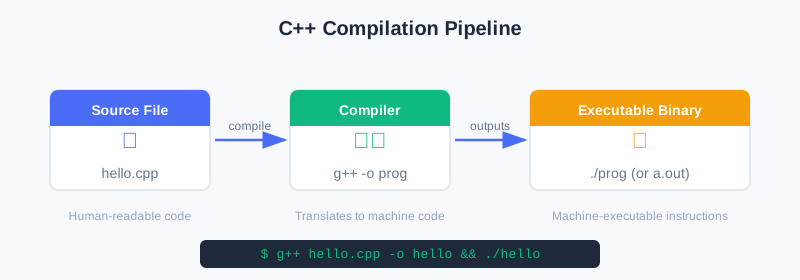
The diagram above shows the three-stage journey from source code to executable: your .cpp file is fed to the g++ compiler, which produces a runnable binary. Understanding this pipeline helps debug compilation errors before they happen.
2.1.2 The Competitive Programmer's Template
When solving USACO problems, you'll use a standard template. Here it is, fully explained:
#include <bits/stdc++.h>      // "batteries included" — includes ALL standard libraries
using namespace std;           // lets us write cout instead of std::cout

int main() {
    ios_base::sync_with_stdio(false);  // disables syncing C and C++ I/O (faster)
    cin.tie(NULL);                      // unties cin from cout (faster input)

    // Your solution code goes here

    return 0;
}
Why #include <bits/stdc++.h>?
This is a GCC-specific header that includes every standard library at once. Instead of writing:
#include <iostream>
#include <vector>
#include <algorithm>
#include <map>
// ... 20 more lines
You write one line. In competitive programming, this is universally accepted and saves time.
Note:
bits/stdc++.honly works with GCC (the compiler USACO judges use). It's fine for competitive programming, but don't use it in production software.
Why using namespace std;?
The standard library puts everything inside a namespace called std. Without this line, you'd write std::cout, std::vector, std::sort everywhere. With using namespace std;, you write cout, vector, sort — much cleaner.
The I/O Speed Lines
ios_base::sync_with_stdio(false);
cin.tie(NULL);
These two lines make cin and cout much faster. Without them, reading large inputs can be 10× slower and cause "Time Limit Exceeded" (TLE) even if your algorithm is correct. Always include them.
🐛 Common Bug: After using these speed lines, don't mix
cin/coutwithscanf/printf. Pick one style.
2.1.3 Variables and Data Types
A variable is a named location in memory that stores a value. In C++, every variable has a type — the type tells the computer how much memory to reserve and what kind of data will go in it.
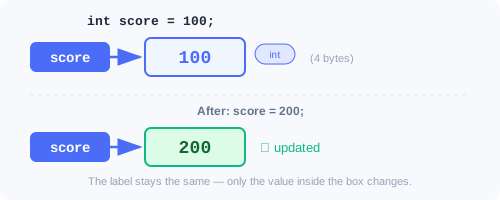
🧠 Mental Model: Variables are like labeled boxes
When you write:   int score = 100;

The computer does three things:
  1. Creates a box big enough to hold an integer (4 bytes)
  2. Puts the label "score" on the box
  3. Puts the number 100 inside the box
The Essential Types for Competitive Programming
#include <bits/stdc++.h>
using namespace std;

int main() {
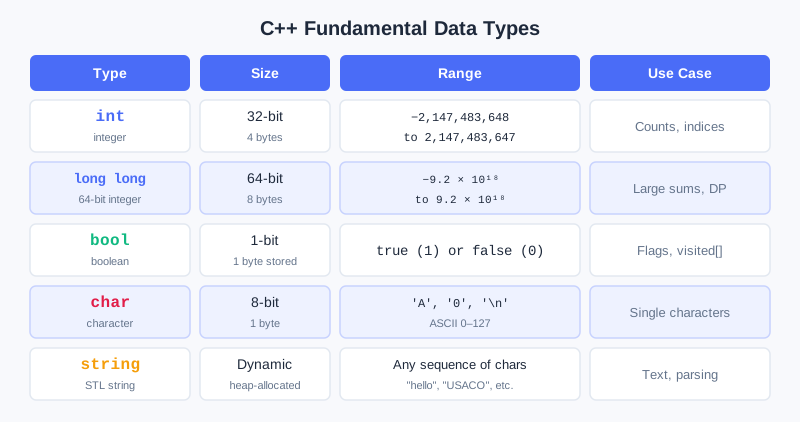
    // int: whole numbers, range: -2,147,483,648 to +2,147,483,647 (about ±2 billion)
    int apples = 42;
    int temperature = -5;

    // long long: big whole numbers, range: about ±9.2 × 10^18
    long long population = 7800000000LL;  // the LL suffix means "this is a long long literal"
    long long trillion = 1000000000000LL;

    // double: decimal/fractional numbers
    double pi = 3.14159265358979;
    double percentage = 99.5;

    // bool: true or false only
    bool isRaining = true;
    bool finished = false;

    // char: a single character (stored as a number 0-255)
    char grade = 'A';     // single quotes for characters
    char newline = '\n';  // special: newline character

    // string: a sequence of characters
    string name = "Alice";         // double quotes for strings
    string greeting = "Hello!";

    // Print them all:
    cout << "Apples: " << apples << "\n";
    cout << "Population: " << population << "\n";
    cout << "Pi: " << pi << "\n";
    cout << "Is raining: " << isRaining << "\n";  // prints 1 for true, 0 for false
    cout << "Grade: " << grade << "\n";
    cout << "Name: " << name << "\n";

    return 0;
}
Visual: C++ Data Types Reference
Choosing the Right Type
| Situation | Type to Use |
|---|---|
| Counting things, small numbers | int |
| Numbers that might exceed 2 billion | long long |
| Decimal/fractional answers | double |
| Yes/no flags | bool |
| Single letters or characters | char |
| Words or sentences | string |
Variable Naming Rules
Variable names follow strict rules in C++. Getting these right is essential — bad names lead to bugs, and illegal names won't compile at all.
The Formal Rules (Enforced by the Compiler)
✅ Legal names must:
- Start with a letter (a-z, A-Z) or underscore
_ - Contain only letters, digits (0-9), and underscores
- Not be a C++ reserved keyword
❌ These will NOT compile:
| Illegal Name | Why It's Wrong |
|---|---|
3apples | Starts with a digit |
my score | Contains a space |
my-score | Contains a hyphen (interpreted as minus) |
int | Reserved keyword |
class | Reserved keyword |
return | Reserved keyword |
⚠️ Case sensitive!
score,Score, andSCOREare three completely different variables. This is a common source of bugs — be consistent.
Common Naming Styles
There are several widely-used naming conventions in C++. You don't have to pick one for competitive programming, but knowing them helps you read other people's code:
| Style | Example | Typically Used For |
|---|---|---|
| camelCase | numStudents, totalScore | Local variables, function parameters |
| PascalCase | MyClass, GraphNode | Classes, structs, type names |
| snake_case | num_students, total_score | Variables, functions (C/Python style) |
| ALL_CAPS | MAX_N, MOD, INF | Constants, macros |
| Single letter | n, m, i, j | Loop indices, math-style competitive programming |
In competitive programming, camelCase and single-letter names are most common. In production code at companies, snake_case or camelCase are standard depending on the style guide.
Best Practices for Naming
1. Be descriptive — make the purpose clear from the name:
// ✅ Good — instantly clear what each variable stores
int numCows = 5;
long long totalMilk = 0;
string cowName = "Bessie";
int maxScore = 100;

// ❌ Bad — legal but confusing
int x = 5;            // What is x? Count? Index? Value?
long long t = 0;      // What is t? Time? Total? Temporary?
string n = "Bessie";  // n usually means "number" — misleading for a name!
2. Use conventional single-letter names only when the meaning is obvious:
// ✅ Acceptable — these are universally understood conventions
for (int i = 0; i < n; i++) { ... }    // i, j, k for loop indices
int n, m;                                // n = count, m = second dimension
cin >> n >> m;                           // in competitive programming, everyone does this

// ❌ Confusing — single letters with no clear convention
int q = 5;   // Is q a count? A query? A coefficient?
char z = 'A'; // Why z?
3. Constants should be ALL_CAPS to stand out:
const int MAX_N = 200005;        // maximum array size
const int MOD = 1000000007;      // modular arithmetic constant
const long long INF = 1e18;      // "infinity" for comparisons
const double PI = 3.14159265359; // mathematical constant
4. Avoid names that look too similar to each other:
// ❌ Easy to mix up
int total1 = 10;
int totall = 20;  // is this "total-L" or "total-1" with a typo?

int O = 0;        // the letter O looks like the digit 0
int l = 1;        // lowercase L looks like the digit 1

// ✅ Better alternatives
int totalA = 10;
int totalB = 20;
5. Don't start names with underscores followed by uppercase letters:
// ❌ Technically compiles, but reserved by the C++ standard
int _Score = 100;   // names like _X are reserved for the compiler/library
int __value = 42;   // double underscore is ALWAYS reserved

// ✅ Safe alternatives
int score = 100;
int myValue = 42;
Naming in Competitive Programming vs. Production Code
| Aspect | Competitive Programming | Production / School Projects |
|---|---|---|
| Variable length | Short is fine: n, m, dp, adj | Descriptive: numStudents, adjacencyList |
| Loop variables | i, j, k always | i, j, k still fine |
| Constants | MAXN, MOD, INF | kMaxSize, kModulus (Google style) |
| Comments | Minimal — speed matters | Thorough — readability matters |
| Goal | Write fast, solve fast | Write code others can maintain |
💡 For this book: We'll use a mix — descriptive names for clarity in explanations, but shorter names when solving problems under time pressure. The important thing is: you should always be able to look at a variable name and immediately know what it stores.
Deep Dive: char, string, and Character-Integer Conversions
Earlier in this chapter we briefly introduced char and string. Since many USACO problems involve character processing, digit extraction, and string manipulation, let's take a deeper look at these essential types.
char and ASCII — Every Character is a Number
A char in C++ is stored as a 1-byte integer (0–255). Each character is mapped to a number according to the ASCII table (American Standard Code for Information Interchange). You don't need to memorize the whole table, but knowing a few key ranges is extremely useful:
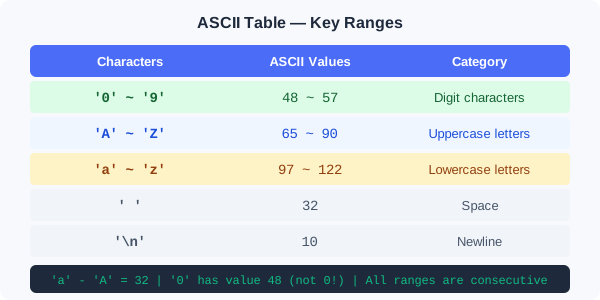
 Key relationships:
 • 'a' - 'A' = 32     (difference between lower and upper case)
 • '0' has ASCII value 48 (not 0!)
 • Digits, uppercase letters, and lowercase letters
   are each in CONSECUTIVE ranges
#include <bits/stdc++.h>
using namespace std;

int main() {
    char ch = 'A';

    // A char IS an integer — you can print its numeric value
    cout << ch << "\n";        // prints: A  (as character)
    cout << (int)ch << "\n";   // prints: 65 (its ASCII value)

    // You can do arithmetic on chars!
    char next = ch + 1;       // 'A' + 1 = 66 = 'B'
    cout << next << "\n";     // prints: B

    // Compare chars (compares their ASCII values)
    cout << ('a' < 'z') << "\n";   // 1 (true, because 97 < 122)
    cout << ('A' < 'a') << "\n";   // 1 (true, because 65 < 97)

    return 0;
}
char ↔ int Conversions — The Most Common Technique
In competitive programming, you constantly need to convert between character digits and integer values. Here's the complete guide:
1. Digit character → Integer value (e.g., '7' → 7)
char ch = '7';
int digit = ch - '0';    // '7' - '0' = 55 - 48 = 7
cout << digit << "\n";   // prints: 7

// This works because digit characters '0'~'9' have consecutive ASCII values:
// '0'=48, '1'=49, ..., '9'=57
// So ch - '0' gives the actual numeric value (0~9)
2. Integer value → Digit character (e.g., 7 → '7')
int digit = 7;
char ch = '0' + digit;   // 48 + 7 = 55 = '7'
cout << ch << "\n";      // prints: 7 (as the character '7')

// Works for digits 0~9 only
3. Uppercase ↔ Lowercase conversion
char upper = 'C';
char lower = upper + 32;           // 'C'(67) + 32 = 'c'(99)
cout << lower << "\n";            // prints: c

// More readable approach using the difference:
char lower2 = upper - 'A' + 'a';  // 'C'-'A' = 2, 'a'+2 = 'c'
cout << lower2 << "\n";           // prints: c

// Reverse: lowercase → uppercase
char ch = 'f';
char upper2 = ch - 'a' + 'A';    // 'f'-'a' = 5, 'A'+5 = 'F'
cout << upper2 << "\n";           // prints: F

// Using built-in functions (recommended for clarity):
cout << (char)toupper('g') << "\n";  // prints: G
cout << (char)tolower('G') << "\n";  // prints: g
4. Check character types (very useful in USACO)
char ch = '5';

// Check if digit
if (ch >= '0' && ch <= '9') {
    cout << "It's a digit!\n";
}

// Check if uppercase letter
if (ch >= 'A' && ch <= 'Z') {
    cout << "Uppercase!\n";
}

// Check if lowercase letter
if (ch >= 'a' && ch <= 'z') {
    cout << "Lowercase!\n";
}

// Or use built-in functions:
// isdigit(ch), isupper(ch), islower(ch), isalpha(ch), isalnum(ch)
if (isdigit(ch)) cout << "Digit!\n";
if (isalpha(ch)) cout << "Letter!\n";
5. A Classic Pattern: Extract Digits from a String
string s = "abc123def";
int sum = 0;
for (char ch : s) {
    if (ch >= '0' && ch <= '9') {
        sum += ch - '0';  // convert digit char to int and add
    }
}
cout << "Sum of digits: " << sum << "\n";  // 1+2+3 = 6
string Detailed Guide
string is C++'s built-in text type. Unlike a single char, a string holds a sequence of characters and provides many useful operations.
Basic operations:
#include <bits/stdc++.h>
using namespace std;

int main() {
    // Creating strings
    string s1 = "Hello";
    string s2 = "World";
    string empty = "";           // empty string
    string repeated(5, 'x');     // "xxxxx" — 5 copies of 'x'

    // Length
    cout << s1.size() << "\n";   // 5 (same as s1.length())

    // Concatenation (joining strings)
    string s3 = s1 + " " + s2;  // "Hello World"
    s1 += "!";                   // s1 is now "Hello!"

    // Access individual characters (0-indexed, just like arrays)
    cout << s3[0] << "\n";      // 'H'
    cout << s3[6] << "\n";      // 'W'

    // Modify individual characters
    s3[0] = 'h';                // "hello World"

    // Comparison (lexicographic, i.e., dictionary order)
    cout << ("apple" < "banana") << "\n";   // 1 (true)
    cout << ("abc" == "abc") << "\n";       // 1 (true)
    cout << ("abc" < "abd") << "\n";        // 1 (true, compares char by char)

    return 0;
}
Iterating over a string:
string s = "USACO";

// Method 1: index-based loop
for (int i = 0; i < (int)s.size(); i++) {
    cout << s[i] << " ";  // U S A C O
}
cout << "\n";

// Method 2: range-based for loop (cleaner)
for (char ch : s) {
    cout << ch << " ";    // U S A C O
}
cout << "\n";

// Method 3: range-based with reference (for modifying in-place)
for (char& ch : s) {
    ch = tolower(ch);     // convert each char to lowercase
}
cout << s << "\n";        // "usaco"
Useful string functions:
string s = "Hello, World!";

// Substring: s.substr(start, length)
string sub = s.substr(7, 5);     // "World" (starting at index 7, take 5 chars)
string sub2 = s.substr(7);       // "World!" (from index 7 to end)

// Find: s.find("text") — returns index or string::npos if not found
size_t pos = s.find("World");    // 7  (size_t, not int!)
if (s.find("xyz") == string::npos) {
    cout << "Not found!\n";
}

// Append
s.append(" Hi");                 // "Hello, World! Hi"
// or equivalently: s += " Hi";

// Insert
s.insert(5, "!!");               // "Hello!!, World! Hi"

// Erase: s.erase(start, count)
s.erase(5, 2);                   // removes 2 chars starting at index 5 → "Hello, World! Hi"

// Replace: s.replace(start, count, "new text")
string msg = "I love cats";
msg.replace(7, 4, "dogs");       // "I love dogs"
Reading strings from input:
// cin >> reads ONE WORD (stops at whitespace)
string word;
cin >> word;    // input "Hello World" → word = "Hello"

// getline reads the ENTIRE LINE (including spaces)
string line;
getline(cin, line);   // input "Hello World" → line = "Hello World"

// ⚠️ Remember: after cin >>, call cin.ignore() before getline!
int n;
cin >> n;
cin.ignore();          // consume the leftover '\n'
string fullLine;
getline(cin, fullLine); // now this reads correctly
Converting between string and numbers:
// String → Integer
string numStr = "42";
int num = stoi(numStr);         // stoi = "string to int" → 42
long long big = stoll("123456789012345"); // stoll = "string to long long"

// String → Double
double d = stod("3.14");       // stod = "string to double" → 3.14

// Integer → String
int x = 255;
string s = to_string(x);       // "255"
string s2 = to_string(3.14);   // "3.140000"
char Arrays (C-Style Strings) — Know They Exist
In C (and old C++ code), strings were stored as arrays of char ending with a special null character '\0'. You'll rarely need these in competitive programming (use string instead), but you should recognize them:
// C-style string (char array)
char greeting[] = "Hello";  // actually stores: H e l l o \0 (6 chars!)
// The '\0' (null terminator) marks the end of the string

// WARNING: you must ensure the array is big enough to hold the string + '\0'
char name[20];              // can hold up to 19 characters + '\0'

// Reading into a char array (rarely needed)
// cin >> name;             // works, but limited by array size
// scanf("%s", name);       // C-style, also works

// Converting between char array and string
string s = greeting;        // char array → string (automatic)
// string → char array: use s.c_str() to get a const char*
Why string is better than char[] for competitive programming:
| Feature | char[] (C-style) | string (C++) |
|---|---|---|
| Size | Must predefine max size | Grows automatically |
| Concatenation | strcat() — manual, error-prone | s1 + s2 — simple |
| Comparison | strcmp() — returns int | s1 == s2 — natural |
| Length | strlen() — O(N) each call | s.size() — O(1) |
| Safety | Buffer overflow risk | Safe, managed by C++ |
⚡ Pro Tip for USACO: Always use
stringunless a problem specifically requireschararrays. String operations are cleaner, safer, and easier to debug. The only common use ofchararrays in competitive programming is when reading very large inputs withscanf/printffor speed — but withsync_with_stdio(false),string+cin/coutis fast enough for 99% of USACO problems.
Quick Reference: Character/String Cheat Sheet
| Task | Code | Example |
|---|---|---|
| Digit char → int | ch - '0' | '7' - '0' → 7 |
| Int → digit char | '0' + digit | '0' + 3 → '3' |
| Uppercase → lowercase | ch - 'A' + 'a' or tolower(ch) | 'C' → 'c' |
| Lowercase → uppercase | ch - 'a' + 'A' or toupper(ch) | 'f' → 'F' |
| Is digit? | ch >= '0' && ch <= '9' or isdigit(ch) | '5' → true |
| Is letter? | isalpha(ch) | 'A' → true |
| String length | s.size() or s.length() | "abc" → 3 |
| Substring | s.substr(start, len) | "Hello".substr(1,3) → "ell" |
| Find in string | s.find("text") | returns index or npos |
| String → int | stoi(s) | stoi("42") → 42 |
| Int → string | to_string(n) | to_string(42) → "42" |
| Traverse string | for (char ch : s) | iterate each character |
⚠️ Integer Overflow — The #1 Bug in Competitive Programming
What happens when a number gets too big for its type?
// Imagine int as a dial that goes from -2,147,483,648 to 2,147,483,647
// When you go past the maximum, it WRAPS AROUND to the minimum!

int x = 2147483647;  // maximum int value
cout << x << "\n";   // prints: 2147483647
x++;                 // add 1... what happens?
cout << x << "\n";   // prints: -2147483648  (OVERFLOW! Wrapped around!)
This is like an old car odometer that hits 999999 and rolls back to 000000. The number wraps around.
How to avoid overflow:
int a = 1000000000;    // 1 billion — fits in int
int b = 1000000000;    // 1 billion — fits in int
// int wrong = a * b;  // OVERFLOW! a*b = 10^18, doesn't fit in int

long long correct = (long long)a * b;  // Cast one to long long before multiplying
cout << correct << "\n";  // 1000000000000000000 ✓

// Rule of thumb: if N can be up to 10^9 and you multiply two such values, use long long
⚡ Pro Tip: When in doubt, use
long long. It's slightly slower thanintbut prevents overflow bugs that are very hard to spot.
2.1.4 Input and Output with cin and cout
Printing Output with cout
int score = 95;
string name = "Alice";

cout << "Score: " << score << "\n";     // Score: 95
cout << name << " got " << score << "\n"; // Alice got 95

// "\n" vs endl
cout << "Line 1" << "\n";   // fast — just a newline character
cout << "Line 2" << endl;   // slow — flushes buffer AND adds newline
⚡ Pro Tip: Always use
"\n"instead ofendl. Theendlflushes the output buffer which is much slower. In problems with lots of output, usingendlcan cause Time Limit Exceeded!
Reading Input with cin
int n;
cin >> n;    // reads one integer from input

string s;
cin >> s;    // reads one word (stops at whitespace — spaces, tabs, newlines)

double x;
cin >> x;    // reads a decimal number
cin >> automatically skips whitespace between values. This means spaces, tabs, and newlines are all treated the same way. So these two inputs are read identically:
Input style 1 (all on one line):   42 hello 3.14
Input style 2 (on separate lines):
42
hello
3.14
Both work with:
int a; string b; double c;
cin >> a >> b >> c;  // reads all three regardless of formatting
Reading Multiple Values — The Most Common USACO Pattern
USACO problems almost always start with: "Read N, then read N values." Here's how:
Typical USACO input:
5          ← first line: N (the number of items)
10 20 30 40 50   ← next line(s): the N items
int n;
cin >> n;              // read N

for (int i = 0; i < n; i++) {
    int x;
    cin >> x;          // read each item
    cout << x * 2 << "\n";  // process it
}
Complexity Analysis:
- Time: O(N) — read N numbers and process each one in O(1)
- Space: O(1) — only one variable
x, no storage of all data
For the input 5\n10 20 30 40 50, this would print:
20
40
60
80
100
Reading a Full Line (Including Spaces)
Sometimes input has multiple words on a line. cin >> only reads one word at a time, so use getline:
string fullName;
getline(cin, fullName);  // reads the entire line, including spaces
cout << "Name: " << fullName << "\n";
🐛 Common Bug: Mixing
cin >>andgetlinecan cause problems. Aftercin >> n, there's a leftover\nin the buffer. If you then callgetline, it will read that empty newline instead of the next line. Fix: callcin.ignore()aftercin >>before usinggetline.
Controlling Decimal Output
double y = 3.14159;

cout << y << "\n";                            // 3.14159 (default)
cout << fixed << setprecision(2) << y << "\n"; // 3.14 (exactly 2 decimal places)
cout << fixed << setprecision(6) << y << "\n"; // 3.141590 (6 decimal places)
2.1.5 Basic Arithmetic
#include <bits/stdc++.h>
using namespace std;

int main() {
    int a = 17, b = 5;

    cout << a + b << "\n";   // 22  (addition)
    cout << a - b << "\n";   // 12  (subtraction)
    cout << a * b << "\n";   // 85  (multiplication)
    cout << a / b << "\n";   // 3   (INTEGER division — truncates toward zero!)
    cout << a % b << "\n";   // 2   (modulo — the REMAINDER after division)

    // Integer division example:
    // 17 ÷ 5 = 3 remainder 2
    // So: 17 / 5 = 3  and  17 % 5 = 2

    double x = 17.0, y = 5.0;
    cout << x / y << "\n";   // 3.4 (real division when operands are doubles)

    // Shorthand assignment operators:
    int n = 10;
    n += 5;    // same as: n = n + 5   → n is now 15
    n -= 3;    // same as: n = n - 3   → n is now 12
    n *= 2;    // same as: n = n * 2   → n is now 24
    n /= 4;    // same as: n = n / 4   → n is now 6
    n++;       // same as: n = n + 1   → n is now 7
    n--;       // same as: n = n - 1   → n is now 6

    cout << n << "\n";  // 6

    return 0;
}
🤔 Why does integer division truncate?
When both operands are integers, C++ does integer division — it discards the fractional part. 17 / 5 gives 3, not 3.4. This is intentional and very useful (e.g., to find which "group" something falls into).
// How many full hours in 200 minutes?
int minutes = 200;
int hours = minutes / 60;     // 200 / 60 = 3 (not 3.33...)
int remaining = minutes % 60; // 200 % 60 = 20
cout << hours << " hours and " << remaining << " minutes\n";  // 3 hours and 20 minutes
// To get decimal division, at least ONE operand must be a double:
int a = 7, b = 2;
cout << a / b << "\n";           // 3    (integer division)
cout << (double)a / b << "\n";   // 3.5  (cast a to double first)
cout << a / (double)b << "\n";   // 3.5  (cast b to double)
cout << 7.0 / 2 << "\n";        // 3.5  (literal 7.0 is a double)
2.1.6 Your First USACO-Style Program
Let's put everything together and write a complete program that reads input and produces output — just like a real USACO problem.
Problem: Read two integers N and M. Print their sum, difference, product, integer quotient, and remainder.
Thinking through it:
- We need two variables to store N and M
- We use
cinto read them - We use
coutto print each result - Since N and M could be large, should we use
long long? Let's be safe.
💡 Beginner's Problem-Solving Flow:
When facing a problem, don't rush to write code. First think through the steps in plain language:
- Understand the problem: What is the input? What is the output? What are the constraints?
- Work through an example by hand: Use the sample input, manually compute the output, confirm you understand the problem
- Think about data ranges: How large can N and M be? Could there be overflow?
- Write pseudocode:
Read → Compute → Output- Translate to C++: Convert pseudocode to real code line by line
This problem: read two numbers → perform five operations → output five results. Very straightforward!
#include <bits/stdc++.h>
using namespace std;

int main() {
    ios_base::sync_with_stdio(false);
    cin.tie(NULL);

    long long n, m;
    cin >> n >> m;  // read both numbers on one line

    cout << n + m << "\n";  // sum
    cout << n - m << "\n";  // difference
    cout << n * m << "\n";  // product
    cout << n / m << "\n";  // integer quotient
    cout << n % m << "\n";  // remainder

    return 0;
}
Complexity Analysis:
- Time: O(1) — only a fixed number of arithmetic operations
- Space: O(1) — only two variables
Sample Input:
17 5
Sample Output:
22
12
85
3
2
⚠️ Common Mistakes in Chapter 2.1
| # | Mistake | Example | Why It's Wrong | Fix |
|---|---|---|---|---|
| 1 | Integer overflow | int a = 1e9; int b = a*a; | a*b = 10^18 exceeds int max ~2.1×10^9, result "wraps around" to wrong value | Use long long |
| 2 | Using endl | cout << x << endl; | endl flushes the output buffer, 10x+ slower than "\n" for large output, may cause TLE | Use "\n" |
| 3 | Forgetting I/O speedup | Missing sync_with_stdio and cin.tie | By default cin/cout syncs with C's scanf/printf, very slow for large input | Always add the two speed lines |
| 4 | Integer division surprise | 7/2 expects 3.5 but gets 3 | Dividing two integers, C++ truncates the fractional part | Cast to double: (double)7/2 |
| 5 | Missing semicolon | cout << x | Every C++ statement must end with ;, otherwise compilation fails | cout << x; |
| 6 | Mixing cin >> and getline | cin >> n then getline(cin, s) | cin >> leaves a \n in the buffer, getline reads an empty line | Add cin.ignore() in between |
Chapter Summary
📌 Key Takeaways
| Concept | Key Points | Why It Matters |
|---|---|---|
#include <bits/stdc++.h> | Includes all standard libraries at once | Saves time in contests, no need to remember each header |
using namespace std; | Omits the std:: prefix | Cleaner code, universal practice in competitive programming |
int main() | The sole entry point of the program | Every C++ program must have exactly one main |
cin >> x / cout << x | Read input / write output | The core I/O method for USACO |
int vs long long | ~2×10^9 vs ~9.2×10^18 | Wrong type = overflow = wrong answer (most common bug in contests) |
"\n" vs endl | "\n" is 10x faster | Determines AC vs TLE for large output |
a / b and a % b | Integer division and remainder | Core tools for time conversion, grouping, etc. |
| I/O Speed Lines | sync_with_stdio(false) + cin.tie(NULL) | Essential in contest template, forgetting may cause TLE |
❓ FAQ
Q1: Does bits/stdc++.h slow down compilation?
A: Yes, compilation time may increase by 1-2 seconds. But in contests, compilation time is not counted toward the time limit, so it doesn't affect results. Don't use it in production projects.
Q2: Which should I default to — int or long long?
A: Rule of thumb — when in doubt, use
long long. It's slightly slower thanint(nearly imperceptible on modern CPUs), but prevents overflow. Especially note: if twointvalues are multiplied, the result may needlong long.
Q3: Why can't I use scanf/printf in USACO?
A: You actually can! But after adding
sync_with_stdio(false), you cannot mixcin/coutwithscanf/printf. Beginners are advised to stick withcin/cout— it's safer.
Q4: Can I omit return 0;?
A: In C++11 and later, if
main()reaches the end without areturn, the compiler automatically returns 0. So technically it can be omitted, but writing it is clearer.
Q5: My code runs correctly locally, but gets Wrong Answer (WA) on the USACO judge. What could be wrong?
A: The three most common reasons: ① Integer overflow (used
intwhenlong longwas needed); ② Not handling all edge cases; ③ Wrong output format (extra or missing spaces/newlines).
🔗 Connections to Later Chapters
- Chapter 2.2 (Control Flow) builds on this chapter by adding
if/elseconditionals andfor/whileloops, enabling you to handle "repeat N times" tasks - Chapter 2.3 (Functions & Arrays) introduces functions (organizing code into reusable blocks) and arrays (storing a collection of data) — core tools for solving USACO problems
- Chapter 3.1 (STL Essentials) introduces STL tools like
vectorandsort, greatly simplifying the logic you write manually in this chapter - The integer overflow prevention techniques learned in this chapter will appear throughout the book, especially in Chapter 3.2 (Prefix Sums) and Chapters 6.1–6.3 (DP)
Practice Problems
Work through all problems in order — they get progressively harder. Each has a complete solution you can reveal after trying it yourself.
🌡️ Warm-Up Problems
These problems only require 1-3 lines of new code each. They're meant to help you practice typing C++ and running programs.
Warm-up 2.1.1 — Personal Greeting Write a program that prints exactly this (with your own name):
Hello, Alice!
My favorite number is 7.
I am learning C++.
(You can hardcode all values — no input needed.)
💡 Solution (click to reveal)
Approach: Just print three lines with cout. No input needed.
#include <bits/stdc++.h>
using namespace std;

int main() {
    cout << "Hello, Alice!\n";
    cout << "My favorite number is 7.\n";
    cout << "I am learning C++.\n";
    return 0;
}
Key points:
- Each
coutstatement ends with;\n"— the\ncreates a new line - You can also chain multiple
<<operators on onecoutline - No
cinneeded when there's no input
Warm-up 2.1.2 — Five Lines
Print the numbers 1 through 5, each on its own line. Use exactly 5 separate cout statements (no loops yet — we cover loops in Chapter 2.2).
💡 Solution (click to reveal)
Approach: Five separate cout statements, one per number.
#include <bits/stdc++.h>
using namespace std;

int main() {
    cout << 1 << "\n";
    cout << 2 << "\n";
    cout << 3 << "\n";
    cout << 4 << "\n";
    cout << 5 << "\n";
    return 0;
}
Key points:
cout << 1 << "\n"prints the number 1 followed by a newline- We'll learn to do this with a loop in Chapter 2.2 — but this manual approach works fine for small counts
Warm-up 2.1.3 — Double It Read one integer from input. Print that integer multiplied by 2.
Sample Input: 7
Sample Output: 14
💡 Solution (click to reveal)
Approach: Read into a variable, multiply by 2, print.
#include <bits/stdc++.h>
using namespace std;

int main() {
    int n;
    cin >> n;
    cout << n * 2 << "\n";
    return 0;
}
Key points:
cin >> nreads one integer and stores it inn- We can do arithmetic directly inside
cout:n * 2is computed first, then printed - Use
long long nif n might be very large (up to 10^9), sincen * 2could overflowint
Warm-up 2.1.4 — Sum of Two Read two integers on the same line. Print their sum.
Sample Input: 15 27
Sample Output: 42
💡 Solution (click to reveal)
Approach: Read two integers, add them, print.
#include <bits/stdc++.h>
using namespace std;

int main() {
    int a, b;
    cin >> a >> b;
    cout << a + b << "\n";
    return 0;
}
Key points:
cin >> a >> breads two values in one statement — works whether they're on the same line or different lines- Declaring two variables on the same line:
int a, b;is equivalent toint a; int b;
Warm-up 2.1.5 — Say Hi
Read a single word (a first name, no spaces). Print Hi, [name]!
Sample Input: Bob
Sample Output: Hi, Bob!
💡 Solution (click to reveal)
Approach: Read a string, then print it inside the greeting message.
#include <bits/stdc++.h>
using namespace std;

int main() {
    string name;
    cin >> name;
    cout << "Hi, " << name << "!\n";
    return 0;
}
Key points:
string name;declares a variable that holds textcin >> namereads one word (stops at the first space)- Notice how
coutcan chain: literal string + variable + literal string
🏋️ Core Practice Problems
These problems require combining input, arithmetic, and output. Think through the math before coding.
Problem 2.1.6 — Age in Days Read a person's age in whole years. Print their approximate age in days (use 365 days per year, ignore leap years).
Sample Input: 15
Sample Output: 5475
💡 Solution (click to reveal)
Approach: Multiply years by 365. Since age × 365 fits in an int (max age ~150 → 150×365 = 54750, well within int range), int is fine here.
#include <bits/stdc++.h>
using namespace std;

int main() {
    int years;
    cin >> years;
    cout << years * 365 << "\n";
    return 0;
}
Key points:
years * 365is computed as integers — no overflow risk here- If you wanted to include hours, minutes, seconds, you'd use
long longto be safe
Problem 2.1.7 — Seconds Converter Read a number of seconds S (1 ≤ S ≤ 10^9). Convert it to hours, minutes, and remaining seconds.
Sample Input: 3661
Sample Output:
1 hours
1 minutes
1 seconds
💡 Solution (click to reveal)
Approach: Use integer division and modulo. First divide by 3600 to get hours, then use the remainder (mod 3600), divide by 60 to get minutes, remaining is seconds.
#include <bits/stdc++.h>
using namespace std;

int main() {
    long long s;
    cin >> s;

    long long hours = s / 3600;         // 3600 seconds per hour
    long long remaining = s % 3600;     // seconds left after removing full hours
    long long minutes = remaining / 60; // 60 seconds per minute
    long long seconds = remaining % 60; // seconds left after removing full minutes

    cout << hours << " hours\n";
    cout << minutes << " minutes\n";
    cout << seconds << " seconds\n";

    return 0;
}
Key points:
- We use
long longbecause S can be up to 10^9 (safe in int, but long long is a good habit) - The key insight:
s % 3600gives the seconds after removing full hours, then we can divide that by 60 to get minutes - Check: 3661 → 3661/3600=1 hour, 3661%3600=61, 61/60=1 minute, 61%60=1 second ✓
Problem 2.1.8 — Rectangle Read the length L and width W of a rectangle. Print its area and perimeter.
Sample Input: 6 4
Sample Output:
Area: 24
Perimeter: 20
💡 Solution (click to reveal)
Approach: Area = L × W, Perimeter = 2 × (L + W).
#include <bits/stdc++.h>
using namespace std;

int main() {
    long long L, W;
    cin >> L >> W;

    cout << "Area: " << L * W << "\n";
    cout << "Perimeter: " << 2 * (L + W) << "\n";

    return 0;
}
Key points:
- Order of operations:
2 * (L + W)— the parentheses ensure we add L+W first, then multiply by 2 - Using
long longin case L and W are large (if L,W up to 10^9, L*W could be up to 10^18)
Problem 2.1.9 — Temperature Converter
Read a temperature in Celsius. Print the equivalent in Fahrenheit. Formula: F = C × 9/5 + 32
Sample Input: 100
Sample Output: 212.00
💡 Solution (click to reveal)
Approach: Apply the formula. Since we need a decimal output, use double. The tricky part is the integer division trap: 9/5 in integer math = 1, not 1.8!
#include <bits/stdc++.h>
using namespace std;

int main() {
    double celsius;
    cin >> celsius;

    double fahrenheit = celsius * 9.0 / 5.0 + 32.0;

    cout << fixed << setprecision(2) << fahrenheit << "\n";

    return 0;
}
Key points:
- Use
9.0 / 5.0(or9.0/5) instead of9/5— the latter is integer division giving1, not1.8! fixed << setprecision(2)forces exactly 2 decimal places in the output- Check: 100°C → 100 × 9.0/5.0 + 32 = 180 + 32 = 212 ✓
Problem 2.1.10 — Coin Counter Read four integers: the number of quarters (25¢), dimes (10¢), nickels (5¢), and pennies (1¢). Print the total value in cents.
Sample Input:
3 2 1 4
(3 quarters, 2 dimes, 1 nickel, 4 pennies)
Sample Output: 104
💡 Solution (click to reveal)
Approach: Multiply each coin count by its value, sum them all.
#include <bits/stdc++.h>
using namespace std;

int main() {
    int quarters, dimes, nickels, pennies;
    cin >> quarters >> dimes >> nickels >> pennies;

    int total = quarters * 25 + dimes * 10 + nickels * 5 + pennies * 1;

    cout << total << "\n";

    return 0;
}
Key points:
- Each coin type multiplied by its value in cents: quarters=25, dimes=10, nickels=5, pennies=1
- Check: 3×25 + 2×10 + 1×5 + 4×1 = 75 + 20 + 5 + 4 = 104 ✓
- If coin counts can be very large, switch to
long long
🏆 Challenge Problems
These require more thought — especially around data types and problem-solving.
Challenge 2.1.11 — Overflow Detector
Read two integers A and B (each up to 10^9). Compute their product TWO ways: as an int and as a long long. Print both results. Observe the difference when overflow occurs.
Sample Input: 1000000000 3
Sample Output:
int product: -1294967296
long long product: 3000000000
(The int result is wrong due to overflow; long long is correct.)
💡 Solution (click to reveal)
Approach: Read both numbers as long long, then compute the product both ways — once forcing integer math, once with long long. This demonstrates overflow visually.
#include <bits/stdc++.h>
using namespace std;

int main() {
    long long a, b;
    cin >> a >> b;

    // Cast to int FIRST to force integer overflow
    int int_product = (int)a * (int)b;

    // Long long multiplication — no overflow for values up to 10^9
    long long ll_product = a * b;

    cout << "int product: " << int_product << "\n";
    cout << "long long product: " << ll_product << "\n";

    return 0;
}
Key points:
(int)a * (int)b— both operands are cast tointbefore multiplication, so the multiplication overflowsa * bwhere a,b arelong long— multiplication is done inlong longspace, no overflow- The actual output for 10^9 × 3: correct is 3×10^9, but
intwraps around because max int ≈ 2.147×10^9 < 3×10^9, so the result overflows to-1294967296 - Lesson: Always use
long longwhen multiplying values that could each be up to ~10^5 or larger
Challenge 2.1.12 — USACO-Style Large Multiply
You're given two integers N and M (1 ≤ N, M ≤ 10^9). Print their product. (This seems simple, but requires long long.)
Sample Input: 1000000000 1000000000
Sample Output: 1000000000000000000
💡 Solution (click to reveal)
Approach: N and M fit individually in int, but N × M = 10^18 — which doesn't fit in int (max ~2.1×10^9) and barely fits in long long (max ~9.2×10^18). Must use long long.
#include <bits/stdc++.h>
using namespace std;

int main() {
    ios_base::sync_with_stdio(false);
    cin.tie(NULL);

    long long n, m;
    cin >> n >> m;

    cout << n * m << "\n";

    return 0;
}
Key points:
- Reading into
long longvariables is the key —cin >> ncan handle values up to 9.2×10^18 - If you read into
intvariables:int n, m; cin >> n >> m; cout << n * m;— this overflows silently and gives the wrong answer - In USACO, always check the constraints: if N can be 10^9, and you might multiply N by N, you need
long long
Challenge 2.1.13 — Quadrant Problem (USACO 2016 February Bronze) Read two non-zero integers x and y. Determine which quadrant of the coordinate plane the point (x, y) is in:
- Quadrant 1: x > 0 and y > 0
- Quadrant 2: x < 0 and y > 0
- Quadrant 3: x < 0 and y < 0
- Quadrant 4: x > 0 and y < 0
Print just the number: 1, 2, 3, or 4.
Sample Input 1: 3 5 → Output: 1
Sample Input 2: -1 2 → Output: 2
Sample Input 3: -4 -7 → Output: 3
Sample Input 4: 8 -3 → Output: 4
💡 Solution (click to reveal)
Approach: Check the signs of x and y. Each combination of positive/negative x and y maps to exactly one quadrant. We use if/else-if chains (covered fully in Chapter 2.2, but straightforward here).
#include <bits/stdc++.h>
using namespace std;

int main() {
    ios_base::sync_with_stdio(false);
    cin.tie(NULL);

    int x, y;
    cin >> x >> y;

    if (x > 0 && y > 0) {
        cout << 1 << "\n";
    } else if (x < 0 && y > 0) {
        cout << 2 << "\n";
    } else if (x < 0 && y < 0) {
        cout << 3 << "\n";
    } else {  // x > 0 && y < 0
        cout << 4 << "\n";
    }

    return 0;
}
Key points:
- The
&&operator means "AND" — both conditions must be true - Since the problem guarantees x ≠ 0 and y ≠ 0, we don't need to handle those edge cases
- The four cases are mutually exclusive (exactly one will be true for any input), so else-if chains work perfectly
- We could simplify using a formula, but the explicit if/else is clearer and equally fast