Chapter 2.3: Functions & Arrays
📝 Prerequisites: Chapters 2.1 & 2.2 (variables, loops, if/else)
As your programs grow larger, you need ways to organize code (functions) and store collections of data (arrays and vectors). This chapter introduces both — two of the most important tools in competitive programming.
2.3.1 Functions — What and Why
🍕 The Recipe Analogy
A function is like a pizza recipe:

- Input (parameters):   ingredients — flour, cheese, tomatoes
- Process (body):       the cooking steps
- Output (return value): the finished pizza

Just like you can make many pizzas using one recipe,
you can call a function many times with different inputs.

pizza("thin crust", "pepperoni")  → one pizza
pizza("thick crust", "mushroom")  → another pizza
Without functions, if you need to compute "is this number prime?" in five different places, you'd copy-paste the same 10 lines of code five times. Then if you find a bug, you have to fix it in all five places!
When to Write a Function
Use a function when:
- You repeat the same logic 3+ times in your program
- A block of code does one clear, named thing (e.g., "check if prime", "compute distance")
- Your
mainis getting too long to read comfortably
Basic Function Syntax
returnType functionName(parameter1Type param1, parameter2Type param2, ...) {
    // function body
    return value;  // must match returnType; omit for void functions
}
Your First Functions
#include <bits/stdc++.h>
using namespace std;

// ---- FUNCTION DEFINITIONS (must come BEFORE they are used, or use prototypes) ----

// Takes one integer, returns its square
int square(int x) {
    return x * x;
}

// Takes two integers, returns the larger one
int maxOf(int a, int b) {
    if (a > b) return a;
    else return b;
}

// void function: does something but doesn't return a value
void printSeparator() {
    cout << "====================\n";
}

// ---- MAIN ----
int main() {
    cout << square(5) << "\n";       // calls square with x=5, prints 25
    cout << square(12) << "\n";      // calls square with x=12, prints 144

    cout << maxOf(7, 3) << "\n";     // prints 7
    cout << maxOf(-5, -2) << "\n";   // prints -2

    printSeparator();                // prints the divider line
    cout << "Done!\n";
    printSeparator();

    return 0;
}
🤔 Why do functions come before main?
C++ reads your file top-to-bottom. When it sees a call like square(5), it needs to already know what square means. If square is defined after main, the compiler will say "I've never heard of square!"
Solution 1: Define all functions above main (simplest approach).
Solution 2: Use a function prototype — a forward declaration telling the compiler "this function exists, I'll define it later":
#include <bits/stdc++.h>
using namespace std;

int square(int x);       // prototype — just the signature, no body
int maxOf(int a, int b); // prototype

int main() {
    cout << square(5) << "\n";   // OK! compiler knows square exists
    return 0;
}

// Full definitions can come after main
int square(int x) {
    return x * x;
}

int maxOf(int a, int b) {
    return (a > b) ? a : b;
}
2.3.2 Void Functions vs Return Functions
void functions: Do something, return nothing
// void functions perform an action
void printLine(int n) {
    for (int i = 0; i < n; i++) {
        cout << "-";
    }
    cout << "\n";
}

// Calling a void function — just call it, don't try to capture a value
printLine(10);    // prints: ----------
printLine(20);    // prints: --------------------
Return functions: Compute and give back a value
// Returns the absolute value of x
int absoluteValue(int x) {
    if (x < 0) return -x;
    return x;
}

// Calling a return function — capture the result in a variable or use it directly
int result = absoluteValue(-7);
cout << result << "\n";           // 7
cout << absoluteValue(-3) << "\n"; // 3 (used directly)
Multiple return statements
A function can have multiple return statements — execution stops at the first one reached:
string classify(int n) {
    if (n < 0) return "negative";   // exits here if n < 0
    if (n == 0) return "zero";      // exits here if n == 0
    return "positive";              // exits here otherwise
}

cout << classify(-5) << "\n";   // negative
cout << classify(0) << "\n";    // zero
cout << classify(3) << "\n";    // positive
2.3.3 Pass by Value vs Pass by Reference
When you pass a variable to a function, there are two ways it can happen. Understanding this is crucial.
Pass by Value (default): Function gets a COPY
void addOne_byValue(int x) {
    x++;  // modifies the LOCAL COPY — original is unchanged
    cout << "Inside function: " << x << "\n";  // 6
}

int main() {
    int n = 5;
    addOne_byValue(n);
    cout << "After function: " << n << "\n";   // still 5! original unchanged
    return 0;
}
Think of it like a photocopy: the function works on a photocopy of the paper. Changes to the photocopy don't affect the original.
Pass by Reference (&): Function works on the ORIGINAL
void addOne_byRef(int& x) {  // & means "reference to the original"
    x++;  // modifies the ORIGINAL variable directly
    cout << "Inside function: " << x << "\n";  // 6
}

int main() {
    int n = 5;
    addOne_byRef(n);
    cout << "After function: " << n << "\n";   // now 6! original was changed
    return 0;
}
When to use each
| Use pass by value when... | Use pass by reference when... |
|---|---|
| Function shouldn't modify original | Function needs to modify original |
| Small types (int, double, char) | Returning multiple values |
| You want safety (no side effects) | Large types (avoiding expensive copy) |
Multiple Return Values via References
A C++ function can only return one value. But you can "return" multiple values through reference parameters:
// Computes both quotient AND remainder simultaneously
void divmod(int a, int b, int& quotient, int& remainder) {
    quotient = a / b;
    remainder = a % b;
}

int main() {
    int q, r;
    divmod(17, 5, q, r);  // q and r are modified by the function
    cout << "17 / 5 = " << q << " remainder " << r << "\n";
    // prints: 17 / 5 = 3 remainder 2
    return 0;
}
2.3.4 Recursion
A recursive function is one that calls itself. It's perfect for problems that break down into smaller versions of the same problem.
Classic Example: Factorial
5! = 5 × 4 × 3 × 2 × 1 = 120
   = 5 × (4!)              ← same problem, smaller input!
💡 Three-Step Recursive Thinking:
- Find "self-similarity": Can the original problem be broken into smaller problems of the same type? 5! = 5 × 4!, and 4! and 5! are the same type ✓
- Identify the base case: What is the smallest case? 0! = 1, cannot be broken down further
- Write the inductive step: n! = n × (n-1)!, call yourself with smaller input
This thinking process will be used repeatedly in Graph Algorithms (Chapter 5.1) and Dynamic Programming (Chapters 6.1–6.3).
int factorial(int n) {
    if (n == 0) return 1;            // BASE CASE: stop recursing
    return n * factorial(n - 1);    // RECURSIVE CASE: reduce to smaller problem
}
Tracing factorial(4):
factorial(4)
= 4 * factorial(3)
= 4 * (3 * factorial(2))
= 4 * (3 * (2 * factorial(1)))
= 4 * (3 * (2 * (1 * factorial(0))))
= 4 * (3 * (2 * (1 * 1)))   ← base case!
= 4 * (3 * (2 * 1))
= 4 * (3 * 2)
= 4 * 6
= 24  ✓
Every recursive function needs:
- A base case — stops the recursion (prevents infinite recursion)
- A recursive case — calls itself with a smaller input
🐛 Common Bug: Forgetting the base case → infinite recursion → "Stack Overflow" crash!
2.3.5 Arrays — Fixed Collections
🏠 The Mailbox Analogy
An array is like a row of mailboxes on a street:
- All mailboxes are the same size (same type)
- Each has a number on the door (the index, starting from 0)
- You can go directly to any mailbox by its number
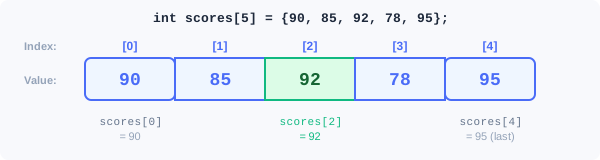
Visual: Array Memory Layout
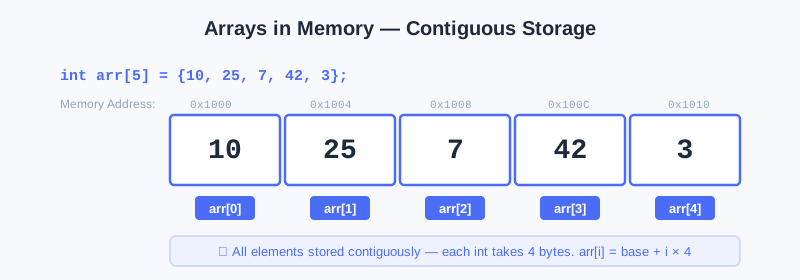
Arrays are stored as consecutive blocks of memory. Each element sits right next to the previous one, allowing O(1) random access.
Array Basics
#include <bits/stdc++.h>
using namespace std;

int main() {
    // Declare an array of 5 integers (elements are uninitialized — garbage values!)
    int arr[5];

    // Assign values one by one
    arr[0] = 10;
    arr[1] = 20;
    arr[2] = 30;
    arr[3] = 40;
    arr[4] = 50;

    // Declare AND initialize at the same time
    int nums[5] = {1, 2, 3, 4, 5};

    // Initialize all elements to zero
    int zeros[100] = {};          // all 100 elements = 0
    int zeros2[100];
    fill(zeros2, zeros2 + 100, 0); // another way

    // Access and print
    cout << arr[2] << "\n";       // 30

    // Loop through the array
    for (int i = 0; i < 5; i++) {
        cout << nums[i] << " ";   // 1 2 3 4 5
    }
    cout << "\n";

    return 0;
}
🐛 The Off-By-One Error — The #1 Array Bug
Arrays are 0-indexed: if you declare int arr[5], valid indices are 0, 1, 2, 3, 4. There is NO arr[5]!
int arr[5] = {10, 20, 30, 40, 50};

// WRONG: loop goes from i=0 to i=5 inclusive — index 5 doesn't exist!
for (int i = 0; i <= 5; i++) {   // BUG: <= 5 should be < 5
    cout << arr[i];               // CRASH or garbage value when i=5
}

// CORRECT: loop from i=0 to i=4 (i < 5 ensures i never reaches 5)
for (int i = 0; i < 5; i++) {    // i goes: 0, 1, 2, 3, 4 ✓
    cout << arr[i];               // always valid
}
This is called an "off-by-one error" — going one element past the end. It's the single most common array bug in competitive programming.
🤔 Why start at 0? C++ inherited this from C, which was designed close to hardware. The index is actually an offset from the start of the array. The first element is at offset 0 (no offset from the beginning).
Global Arrays for Large Sizes
The local variables inside main live on the "stack," which has limited space (~1-8 MB). For competitive programming with N up to 10^6, you need global arrays (live in a different memory area, much larger):
#include <bits/stdc++.h>
using namespace std;

const int MAXN = 1000001;  // max size + 1 (common convention)
int arr[MAXN];              // declared globally — safe for large sizes
// Global arrays are automatically initialized to 0!

int main() {
    int n;
    cin >> n;
    for (int i = 0; i < n; i++) {
        cin >> arr[i];
    }
    return 0;
}
⚡ Pro Tip: Global arrays are initialized to 0 automatically. Local arrays are NOT — they contain garbage values until you assign them!
2.3.6 Common Array Algorithms
Find Sum, Max, Min
int n;
cin >> n;

vector<int> arr(n);    // we'll learn vectors soon; this works like an array
for (int i = 0; i < n; i++) cin >> arr[i];

// Sum
long long sum = 0;
for (int i = 0; i < n; i++) sum += arr[i];
cout << "Sum: " << sum << "\n";

// Max (initialize to first element!)
int maxVal = arr[0];
for (int i = 1; i < n; i++) {
    if (arr[i] > maxVal) maxVal = arr[i];
}
cout << "Max: " << maxVal << "\n";

// Min (same idea)
int minVal = arr[0];
for (int i = 1; i < n; i++) {
    minVal = min(minVal, arr[i]);  // min() is a built-in function
}
cout << "Min: " << minVal << "\n";
Complexity Analysis:
- Time: O(N) — each algorithm only needs one pass through the array
- Space: O(1) — only a few extra variables (not counting the input array itself)
Reverse an Array
int arr[] = {1, 2, 3, 4, 5};
int n = 5;

// Swap elements from both ends, moving toward the middle
for (int i = 0, j = n - 1; i < j; i++, j--) {
    swap(arr[i], arr[j]);  // swap() is a built-in function
}
// arr is now {5, 4, 3, 2, 1}
Complexity Analysis:
- Time: O(N) — each pair of elements is swapped once, N/2 swaps total
- Space: O(1) — in-place swap, no extra array needed
Two-Dimensional Arrays
A 2D array is like a table or grid. Perfect for maps, grids, matrices:
int grid[3][4];  // 3 rows, 4 columns

// Fill with i * 10 + j
for (int r = 0; r < 3; r++) {
    for (int c = 0; c < 4; c++) {
        grid[r][c] = r * 10 + c;
    }
}

// Print
for (int r = 0; r < 3; r++) {
    for (int c = 0; c < 4; c++) {
        cout << grid[r][c] << "\t";
    }
    cout << "\n";
}
Output:
0   1   2   3
10  11  12  13
20  21  22  23
2.3.7 Vectors — Dynamic Arrays
Arrays have a major limitation: their size must be known at compile time (or must be declared large enough in advance). Vectors solve this — they can grow and shrink as needed while your program is running.
Array vs Vector Comparison
| Feature | Array | Vector |
|---|---|---|
| Size | Fixed at compile time | Can grow/shrink at runtime |
| Read N elements | Must hardcode or use MAXN | push_back(x) works naturally |
| Memory location | Stack (fast, limited) | Heap (slightly slower, unlimited) |
| Syntax | int arr[5] | vector<int> v(5) |
| Preferred in competitive programming | For fixed-size, simple cases | For most problems |
Vector Basics
#include <bits/stdc++.h>
using namespace std;

int main() {
    // Create an empty vector
    vector<int> v;

    // Add elements to the back with push_back
    v.push_back(10);    // v = [10]
    v.push_back(20);    // v = [10, 20]
    v.push_back(30);    // v = [10, 20, 30]

    // Access by index (same as arrays, 0-indexed)
    cout << v[0] << "\n";     // 10
    cout << v[1] << "\n";     // 20

    // Useful functions
    cout << v.size() << "\n"; // 3 (number of elements)
    cout << v.front() << "\n"; // 10 (first element)
    cout << v.back() << "\n";  // 30 (last element)
    cout << v.empty() << "\n"; // 0 (false — not empty)

    // Remove last element
    v.pop_back();   // v = [10, 20]

    // Clear all elements
    v.clear();      // v = []
    cout << v.empty() << "\n"; // 1 (true — now empty)

    return 0;
}
Creating Vectors With Initial Values
vector<int> zeros(10, 0);       // ten 0s: [0, 0, 0, 0, 0, 0, 0, 0, 0, 0]
vector<int> ones(5, 1);         // five 1s: [1, 1, 1, 1, 1]
vector<int> primes = {2, 3, 5, 7, 11};  // initialized from list
vector<int> empty;              // empty vector
Iterating Over a Vector
vector<int> v = {10, 20, 30, 40, 50};

// Method 1: index-based (like arrays)
for (int i = 0; i < (int)v.size(); i++) {
    cout << v[i] << " ";
}
cout << "\n";

// Method 2: range-based for loop (cleaner, preferred)
for (int x : v) {
    cout << x << " ";
}
cout << "\n";

// Method 3: range-based with reference (use when modifying)
for (int& x : v) {
    x *= 2;  // doubles each element in-place
}
🤔 Why
(int)v.size()in the index-based loop?v.size()returns an unsigned integer. If you compareint iwith an unsigned value, C++ can behave unexpectedly (especially ifigoes negative). Casting to(int)is the safe habit.
The Standard USACO Pattern with Vectors
int n;
cin >> n;

vector<int> arr(n);         // create vector of size n
for (int i = 0; i < n; i++) {
    cin >> arr[i];          // read into each position
}

// Now process arr...
sort(arr.begin(), arr.end());  // sort ascending
2D Vectors
int rows = 3, cols = 4;
vector<vector<int>> grid(rows, vector<int>(cols, 0));  // 3×4 grid of 0s

// Access: grid[r][c]
grid[1][2] = 42;
cout << grid[1][2] << "\n";  // 42
2.3.8 Passing Arrays and Vectors to Functions
Arrays
When you pass an array to a function, the function receives a pointer to the first element. Changes inside the function affect the original:
void fillSquares(int arr[], int n) {  // arr[] syntax for array parameter
    for (int i = 0; i < n; i++) {
        arr[i] = i * i;   // modifies the original!
    }
}

int main() {
    int arr[5] = {0};
    fillSquares(arr, 5);
    // arr is now {0, 1, 4, 9, 16}
    for (int i = 0; i < 5; i++) cout << arr[i] << " ";
    cout << "\n";
    return 0;
}
Vectors
Vectors by default are copied when passed to functions (expensive for large vectors!). Use & to pass by reference:
// Pass by value — makes a copy (SLOW for large vectors)
void printVec(vector<int> v) {
    for (int x : v) cout << x << " ";
}

// Pass by reference — no copy, CAN modify original (use for output params)
void sortVec(vector<int>& v) {
    sort(v.begin(), v.end());
}

// Pass by const reference — no copy, CANNOT modify (best for read-only)
void printVecFast(const vector<int>& v) {
    for (int x : v) cout << x << " ";
}
⚡ Pro Tip: For any vector parameter that you're only reading (not modifying), always write
const vector<int>&. It avoids the copy and also signals to readers that the function won't change the vector.
⚠️ Common Mistakes in Chapter 2.3
| # | Mistake | Example | Why It's Wrong | Fix |
|---|---|---|---|---|
| 1 | Off-by-one array out-of-bounds | arr[n] when array size is n | Valid indices are 0 to n-1, arr[n] is out-of-bounds | Use i < n instead of i <= n |
| 2 | Forgot recursive base case | int f(int n) { return n*f(n-1); } | Never stops, causes stack overflow crash | Add if (n == 0) return 1; |
| 3 | Recursive function receives invalid (e.g. negative) argument | factorial(-1) | Base case only handles n == 0; negative values cause infinite recursion → stack overflow | Before calling, ensure input is within valid range; or在函数入口加防御:if (n < 0) return -1; |
| 4 | Vector passed by value causes performance issue | void f(vector<int> v) | Copies entire vector, very slow when N is large | Use const vector<int>& v |
| 5 | Local array uninitialized | int arr[100]; sum += arr[50]; | Local arrays are not auto-zeroed, contain garbage values | Use = {} to initialize or use global arrays |
| 6 | Array too large inside main | int main() { int arr[1000000]; } | Exceeds stack memory limit (usually 1-8 MB), program crashes | Put large arrays outside main (global) |
| 7 | Function defined after call | main calls square(5) but square is defined below main | Compiler does not recognize undefined functions | Define function before main, or use function prototype |
Chapter Summary
📌 Key Takeaways
| Concept | Key Points | Why It Matters |
|---|---|---|
| Functions | Define once, call anywhere | Reduce duplicate code, improve readability |
| Return types | int, double, bool, void | Use different return types for different scenarios |
| Pass by value | Function gets a copy, original unchanged | Safe, no side effects |
Pass by reference (&) | Function operates on original variable | Can modify original, avoids copying large objects |
| Recursion | Function calls itself, must have base case | Foundation of divide & conquer, backtracking, DP |
| Arrays | Fixed size, 0-indexed, O(1) random access | Most fundamental data structure in competitive programming |
| Global arrays | Avoid stack overflow, auto-initialized to 0 | Must use global arrays when N exceeds 10^5 |
vector<int> | Dynamic array, variable size | Preferred data container in competitive programming |
push_back / pop_back | Add/remove at end | O(1) operation, primary way to build dynamic collections |
| Prefix Sum | Preprocess O(N), query O(1) | Core technique for range sum queries, covered in depth in Chapter 3.2 |
❓ FAQ
Q1: Which is better, arrays or vectors?
A: Both are common in competitive programming. Rule of thumb: if the size is fixed and known, global arrays are simplest; if the size changes dynamically or needs to be passed to functions, use
vector. Many contestants default tovectorbecause it is more flexible and less error-prone.
Q2: Is there a limit to recursion depth? Can it crash?
A: Yes. Each function call allocates space on the stack, and the default stack size is about 1-8 MB. In practice, about 10^4 ~ 10^5 levels of recursion are supported. If exceeded, the program crashes with a "stack overflow". In contests, if recursion depth may exceed 10^4, consider switching to an iterative (loop) approach.
Q3: When should I use pass by reference (&)?
A: Two cases: ① You need to modify the original variable inside the function; ② The parameter is a large object (like
vectororstring) and you want to avoid copy overhead. For small types likeintanddouble, copy overhead is negligible, so pass by value is fine.
Q4: Can a function return an array or vector?
A: Arrays cannot be returned directly, but
vectorcan!vector<int> solve() { ... return result; }is perfectly valid. Modern C++ compilers optimize the return process (called RVO), so the entire vector is not actually copied.
Q5: Why does the prefix sum array have one extra index? prefix[n+1] instead of prefix[n]?
A:
prefix[0] = 0is a "sentinel value" that makes the formulaprefix[R+1] - prefix[L]work in all cases. Without this sentinel, querying [0, R] would require special handling when L=0. This is a very common programming trick: use an extra sentinel value to simplify boundary handling.
🔗 Connections to Later Chapters
- Chapter 3.1 (STL Essentials) will introduce tools like
sort,binary_search, andpair, letting you accomplish in one line what this chapter implements by hand - Chapter 3.2 (Prefix Sums) will dive deeper into the prefix sum technique introduced in Problem 3.10, including 2D prefix sums and difference arrays
- Chapter 5.1 (Introduction to Graphs) will build on the recursion foundation in Section 2.3.4 to teach graph traversals like DFS and BFS
- Chapters 6.1–6.3 (Dynamic Programming): the core idea of "breaking large problems into smaller ones" is closely related to recursion; this chapter's recursive thinking is important groundwork
- The function encapsulation and array/vector operations learned in this chapter will be used continuously in every subsequent chapter
Practice Problems
🌡️ Warm-Up Problems
Warm-up 2.3.1 — Square Function
Write a function int square(int x) that returns x². In main, read one integer and print its square.
Sample Input: 7 → Sample Output: 49
💡 Solution (click to reveal)
Approach: Write the function above main, call it with the input.
#include <bits/stdc++.h>
using namespace std;

int square(int x) {
    return x * x;
}

int main() {
    int n;
    cin >> n;
    cout << square(n) << "\n";
    return 0;
}
Key points:
- Function defined above
mainso the compiler knows about it return x * x;— C++ evaluatesx * xand returns the result- Use
long longif x can be large (e.g., x up to 10^9, then x² up to 10^18)
Warm-up 2.3.2 — Max of Two
Write a function int myMax(int a, int b) that returns the larger of two integers. In main, read two integers and print the larger.
Sample Input: 13 7 → Sample Output: 13
💡 Solution (click to reveal)
Approach: Compare a and b, return whichever is larger.
#include <bits/stdc++.h>
using namespace std;

int myMax(int a, int b) {
    if (a > b) return a;
    return b;
}

int main() {
    int a, b;
    cin >> a >> b;
    cout << myMax(a, b) << "\n";
    return 0;
}
Key points:
- C++ has a built-in
max(a, b)function — but writing your own teaches the concept - Alternative using ternary operator:
return (a > b) ? a : b;
Warm-up 2.3.3 — Reverse Array
Declare an array of exactly 5 integers: {1, 2, 3, 4, 5}. Print them in reverse order (no input needed).
Expected Output:
5 4 3 2 1
💡 Solution (click to reveal)
Approach: Loop from index 4 down to 0 (backwards).
#include <bits/stdc++.h>
using namespace std;

int main() {
    int arr[5] = {1, 2, 3, 4, 5};

    for (int i = 4; i >= 0; i--) {
        cout << arr[i];
        if (i > 0) cout << " ";
    }
    cout << "\n";

    return 0;
}
Key points:
- Loop from index
n-1 = 4down to0(inclusive), usingi-- - The
if (i > 0) cout << " "avoids a trailing space — but for USACO, a trailing space is usually acceptable
Warm-up 2.3.4 — Vector Sum
Create a vector, push the values 10, 20, 30, 40, 50 into it using push_back, then print their sum.
Expected Output: 150
💡 Solution (click to reveal)
Approach: Create empty vector, push 5 values, loop to sum.
#include <bits/stdc++.h>
using namespace std;

int main() {
    vector<int> v;
    v.push_back(10);
    v.push_back(20);
    v.push_back(30);
    v.push_back(40);
    v.push_back(50);

    long long sum = 0;
    for (int x : v) {
        sum += x;
    }

    cout << sum << "\n";
    return 0;
}
Key points:
- Range-for
for (int x : v)iterates over every element accumulate(v.begin(), v.end(), 0LL)is a one-liner alternative
Warm-up 2.3.5 — Hello N Times
Write a void function sayHello(int n) that prints "Hello!" exactly n times. Call it from main after reading n.
Sample Input: 3
Sample Output:
Hello!
Hello!
Hello!
💡 Solution (click to reveal)
Approach: A void function with a for loop inside.
#include <bits/stdc++.h>
using namespace std;

void sayHello(int n) {
    for (int i = 0; i < n; i++) {
        cout << "Hello!\n";
    }
}

int main() {
    int n;
    cin >> n;
    sayHello(n);
    return 0;
}
Key points:
voidmeans the function returns nothing — noreturn value;needed (can use barereturn;to exit early)- The
ninsayHello's parameter is a separate copy from theninmain(pass by value)
🏋️ Core Practice Problems
Problem 2.3.6 — Array Reverse Read N (1 ≤ N ≤ 100), then read N integers. Print them in reverse order.
Sample Input:
5
1 2 3 4 5
Sample Output: 5 4 3 2 1
💡 Solution (click to reveal)
Approach: Store in a vector, then print from the last index to the first.
#include <bits/stdc++.h>
using namespace std;

int main() {
    ios_base::sync_with_stdio(false);
    cin.tie(NULL);

    int n;
    cin >> n;

    vector<int> arr(n);
    for (int i = 0; i < n; i++) {
        cin >> arr[i];
    }

    for (int i = n - 1; i >= 0; i--) {
        cout << arr[i];
        if (i > 0) cout << " ";
    }
    cout << "\n";

    return 0;
}
Key points:
vector<int> arr(n)creates a vector of size n (all zeros initially)- We read into
arr[i]just like an array - Print from
n-1down to0inclusive
Problem 2.3.7 — Running Average Read N (1 ≤ N ≤ 100), then read N integers one at a time. After reading each integer, print the average of all integers read so far (as a decimal with 2 decimal places).
Sample Input:
4
10 20 30 40
Sample Output:
10.00
15.00
20.00
25.00
💡 Solution (click to reveal)
Approach: Keep a running sum. After each new input, divide by how many we've read so far.
#include <bits/stdc++.h>
using namespace std;

int main() {
    ios_base::sync_with_stdio(false);
    cin.tie(NULL);

    int n;
    cin >> n;

    long long sum = 0;
    for (int i = 1; i <= n; i++) {
        int x;
        cin >> x;
        sum += x;
        double avg = (double)sum / i;
        cout << fixed << setprecision(2) << avg << "\n";
    }

    return 0;
}
Key points:
sumis updated with each new element;iis the count of elements read so far(double)sum / i— cast to double before dividing so we get decimal resultfixed << setprecision(2)forces exactly 2 decimal places
Problem 2.3.8 — Frequency Count Read N (1 ≤ N ≤ 100) integers. Each integer is between 1 and 10 inclusive. Print how many times each value from 1 to 10 appears.
Sample Input:
7
3 1 2 3 3 1 7
Sample Output:
1 appears 2 times
2 appears 1 times
3 appears 3 times
4 appears 0 times
5 appears 0 times
6 appears 0 times
7 appears 1 times
8 appears 0 times
9 appears 0 times
10 appears 0 times
💡 Solution (click to reveal)
Approach: Use an array (or vector) as a "tally counter" — index 1 through 10 holds the count for that value.
#include <bits/stdc++.h>
using namespace std;

int main() {
    ios_base::sync_with_stdio(false);
    cin.tie(NULL);

    int n;
    cin >> n;

    int freq[11] = {};  // indices 0-10; we'll use 1-10. Initialize all to 0.

    for (int i = 0; i < n; i++) {
        int x;
        cin >> x;
        freq[x]++;    // increment the count for value x
    }

    for (int v = 1; v <= 10; v++) {
        cout << v << " appears " << freq[v] << " times\n";
    }

    return 0;
}
Key points:
freq[x]++is a very common pattern — use the VALUE as the INDEX in a frequency array- We declare
freq[11]with indices 0-10 so thatfreq[10]is valid (index 10 for value 10) int freq[11] = {}— the= {}zero-initializes all elements
Problem 2.3.9 — Two Sum
Read N (1 ≤ N ≤ 100) integers and a target value T. Print YES if any two different elements in the array sum to T, NO otherwise.
Sample Input:
5 9
1 4 5 6 3
(N=5, T=9, then the array)
Sample Output: YES (because 4+5=9 or 3+6=9)
💡 Solution (click to reveal)
Approach: Check all pairs (i, j) where i < j. If any pair sums to T, print YES.
#include <bits/stdc++.h>
using namespace std;

int main() {
    ios_base::sync_with_stdio(false);
    cin.tie(NULL);

    int n, t;
    cin >> n >> t;

    vector<int> arr(n);
    for (int i = 0; i < n; i++) cin >> arr[i];

    bool found = false;
    for (int i = 0; i < n && !found; i++) {
        for (int j = i + 1; j < n; j++) {
            if (arr[i] + arr[j] == t) {
                found = true;
                break;
            }
        }
    }

    cout << (found ? "YES" : "NO") << "\n";

    return 0;
}
Key points:
- Inner loop starts at
j = i + 1to avoid using the same element twice and checking duplicate pairs break+ the&& !foundcondition in the outer loop ensures we stop as soon as we find a match- This is O(N²) — fine for N ≤ 100. For N up to 10^5, you'd use a set (Chapter 3.1)
Problem 2.3.10 — Prefix Sums Read N (1 ≤ N ≤ 1000), then N integers. Then read Q queries (1 ≤ Q ≤ 1000), each with two integers L and R (0-indexed, inclusive). For each query, print the sum of elements from index L to R.
Sample Input:
5
1 2 3 4 5
3
0 2
1 3
2 4
Sample Output:
6
9
12
💡 Solution (click to reveal)
Why not sum directly for each query? Brute force: each query loops from L to R, time complexity O(N), all queries total O(N×Q). When N=10^5, Q=10^5, that is 10^{10} operations—far exceeding the time limit.
Optimization idea: Preprocess the array once in O(N), then each query takes only O(1). Total time O(N+Q), much faster! This is the core idea of prefix sums (covered in depth in Chapter 3.2).
Approach: Build a prefix sum array where prefix[i] = sum of arr[0..i-1]. Then sum from L to R = prefix[R+1] - prefix[L]. This gives O(1) per query instead of O(N).
#include <bits/stdc++.h>
using namespace std;

int main() {
    ios_base::sync_with_stdio(false);
    cin.tie(NULL);

    int n;
    cin >> n;

    vector<long long> arr(n), prefix(n + 1, 0);

    for (int i = 0; i < n; i++) {
        cin >> arr[i];
        prefix[i + 1] = prefix[i] + arr[i];  // build prefix sum
    }
    // prefix[0] = 0
    // prefix[1] = arr[0]
    // prefix[2] = arr[0] + arr[1]
    // prefix[i] = arr[0] + arr[1] + ... + arr[i-1]

    int q;
    cin >> q;
    while (q--) {
        int l, r;
        cin >> l >> r;
        // sum from l to r (inclusive) = prefix[r+1] - prefix[l]
        cout << prefix[r + 1] - prefix[l] << "\n";
    }

    return 0;
}
Key points:
prefix[i]= sum of the firstielements (prefix[0] = 0 is a sentinel)- Sum of arr[L..R] = prefix[R+1] - prefix[L] — subtracting the part before L
- Check with sample: arr=[1,2,3,4,5], prefix=[0,1,3,6,10,15]. Query [0,2]: prefix[3]-prefix[0]=6-0=6 ✓
Complexity Analysis:
- Time: O(N + Q) — preprocess O(N) + each query O(1) × Q queries
- Space: O(N) — prefix sum array uses N+1 space
💡 Brute force vs optimized: Brute force O(N×Q) vs prefix sum O(N+Q). When N=Q=10^5, the former takes 10^{10} operations (TLE), the latter only 2×10^5 operations (instant).
🏆 Challenge Problems
Challenge 2.3.11 — Rotate Array Read N (1 ≤ N ≤ 1000) and K (0 ≤ K < N). Read N integers. Print the array rotated right by K positions (the last K elements wrap to the front).
Sample Input:
5 2
1 2 3 4 5
Sample Output: 4 5 1 2 3
💡 Solution (click to reveal)
Approach: The new array has element at original position (i - K + N) % N at position i. Equivalently, print elements starting from index N-K, wrapping around.
#include <bits/stdc++.h>
using namespace std;

int main() {
    ios_base::sync_with_stdio(false);
    cin.tie(NULL);

    int n, k;
    cin >> n >> k;

    vector<int> arr(n);
    for (int i = 0; i < n; i++) cin >> arr[i];

    // Print n elements starting from index (n - k) % n, wrapping around
    for (int i = 0; i < n; i++) {
        int idx = (n - k + i) % n;
        cout << arr[idx];
        if (i < n - 1) cout << " ";
    }
    cout << "\n";

    return 0;
}
Key points:
- Right rotate by K: last K elements come first, then first N-K elements
(n - k + i) % nmaps new positionito old position — the% nhandles the wraparound- Check: n=5, k=2. i=0: idx=(5-2+0)%5=3 → arr[3]=4. i=1: idx=4 → arr[4]=5. i=2: idx=0 → arr[0]=1. Correct!
Challenge 2.3.12 — Merge Sorted Arrays Read N₁, then N₁ sorted integers. Read N₂, then N₂ sorted integers. Print the merged sorted array.
Sample Input:
3
1 3 5
4
2 4 6 8
Sample Output: 1 2 3 4 5 6 8
💡 Solution (click to reveal)
Approach: Use two pointers — one for each array. At each step, take the smaller of the two current elements.
#include <bits/stdc++.h>
using namespace std;

int main() {
    ios_base::sync_with_stdio(false);
    cin.tie(NULL);

    int n1;
    cin >> n1;
    vector<int> a(n1);
    for (int i = 0; i < n1; i++) cin >> a[i];

    int n2;
    cin >> n2;
    vector<int> b(n2);
    for (int i = 0; i < n2; i++) cin >> b[i];

    // Two-pointer merge
    int i = 0, j = 0;
    vector<int> result;

    while (i < n1 && j < n2) {
        if (a[i] <= b[j]) {
            result.push_back(a[i++]);  // take from a, advance i
        } else {
            result.push_back(b[j++]);  // take from b, advance j
        }
    }
    // One array may have leftover elements
    while (i < n1) result.push_back(a[i++]);
    while (j < n2) result.push_back(b[j++]);

    for (int idx = 0; idx < (int)result.size(); idx++) {
        cout << result[idx];
        if (idx < (int)result.size() - 1) cout << " ";
    }
    cout << "\n";

    return 0;
}
Key points:
- Two pointers
iandjscan through arraysaandbsimultaneously - We always pick the smaller current element — this maintains sorted order
- After the while loop, one array might still have elements — copy those directly
Challenge 2.3.13 — Smell Distance (Inspired by USACO Bronze)
N cows are standing in a line. Each cow has a position p[i] and a smell radius s[i]. A cow can smell another if the distance between them is at most the sum of their radii. Read N, then N pairs (position, radius). Print the number of pairs of cows that can smell each other.
Sample Input:
4
1 2
5 1
8 3
15 1
Sample Output: 1
(Pair (0,1): dist=|1-5|=4, radii sum=2+1=3. 4>3, NO. Pair (0,2): dist=|1-8|=7, sum=2+3=5. 7>5, NO. Pair (1,2): dist=|5-8|=3, sum=1+3=4. 3≤4, YES. Pair (0,3): 14>3 NO. Pair (1,3): 10>2 NO. Pair (2,3): 7>4 NO. Total: 1.)
💡 Solution (click to reveal)
Approach: Check all pairs (i, j) where i < j. For each pair, compute the distance and compare to the sum of their radii.
#include <bits/stdc++.h>
using namespace std;

int main() {
    ios_base::sync_with_stdio(false);
    cin.tie(NULL);

    int n;
    cin >> n;

    vector<long long> pos(n), rad(n);
    for (int i = 0; i < n; i++) {
        cin >> pos[i] >> rad[i];
    }

    int count = 0;
    for (int i = 0; i < n; i++) {
        for (int j = i + 1; j < n; j++) {
            long long dist = abs(pos[i] - pos[j]);
            long long sumRad = rad[i] + rad[j];
            if (dist <= sumRad) {
                count++;
            }
        }
    }

    cout << count << "\n";
    return 0;
}
Key points:
- Check all pairs (i, j) with i < j to avoid counting the same pair twice
abs(pos[i] - pos[j])computes the absolute distance between positions- Use
long longin case positions and radii are large